

Welcome to Woodland Park School District's Registration Hub!

We understand that navigating the educational landscape can be overwhelming, especially when determining which school best fits your child's needs.
This page is your comprehensive guide, offering information on enrollment timelines, school zones, and other essential details.
If you are unsure about the registration process or have questions about which school is the right fit for your child(ren), scroll down or select a specific topic for detailed information. We've compiled information to guide you through every step. Should you still require assistance, please feel free to contact us at registration@wpsdk12.org.
Important Information
Registration for the upcoming school year, 2026-2027, opened on February 9, 2026. Classes begin on August 19, 2026.
Homeschool registration for each new school year opens on May 1st.

Elementary School Zone Boundaries
These boundaries are tailored to two elementary schools – Columbine and Summit – covering Pre-K through 6th grade. If you're a WPSD resident registering a 7th-12th grade student, choose Woodland Park JR/Sr High School. Residents of the Westcreek neighborhood must apply for choice enrollment since they reside in Douglas County School District.
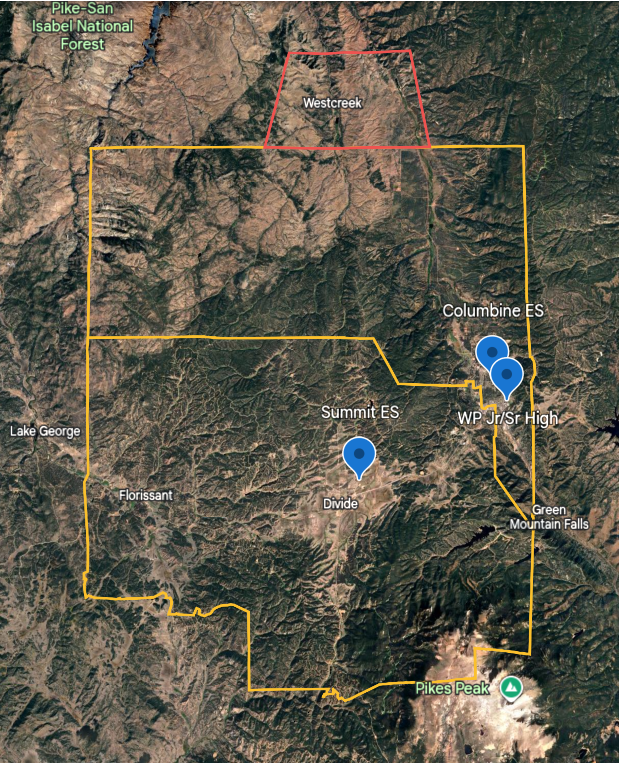
Please check your address using Google Earth to see which school zone you reside in. Simply type your address into the search bar at the top left. You can do this on a computer or download the Google Earth app to access it on your phone or tablet.
If you find that your address is outside the yellow boundary lines, requesting choice enrollment becomes necessary if you wish for your student to potentially attend a Woodland Park School District school. For any questions or clarifications, feel free to reach out to us at registration@wpsdk12.org.
Choice Application

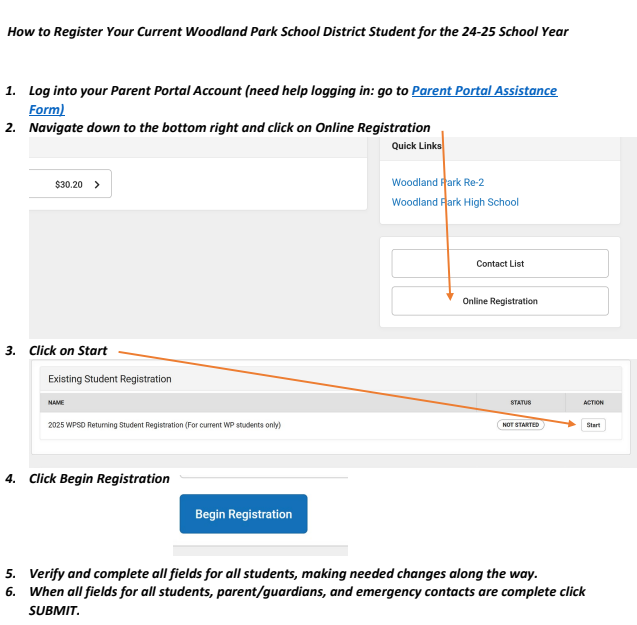
Returning Student Registration
"Returning students" are those that currently attend a WPSD school.
Do you have a new student in your household? You can add them as a new student during the returning student registration process.
Note: While Middle and High School students select their classes at the end of the prior school year, completing the returning student online registration (OLR) is necessary to lock in those classes and be able to participate is sports/activities/clubs.
Do you know for sure that your child will not attend a WPSD school for the 2026-2027 school year? You can fill out a Notification of Intent to Withdrawal now (anticipated last day of attendance would be May 21st) and we will end your child’s enrollment with WPSD on the last day of school. Click here to fill out the withdrawal form. If you are unsure, register your child now and you can fill out the withdrawal form later if needed.
Click here to access the Infinite Campus Parent Portal online (or download the app):
Registration Instructions
Log into your Infinite Campus Parent Portal account.
On the bottom right side of the screen, click the “Online Registration” button.
You can also get there by selecting the menu in the top left corner of the screen, scroll to the bottom and select “More”, then click “Online Registration”.
See the existing student registration named 2026-2027 WPSD Student Registration and click the “Start” button.
Click the “Begin Registration” button.
Review, verify, and/or update each section.
In the first section, you can update the primary household phone number and select the messenger/communication preferences.
If you have a new physical address, select “No” from the dropdown menu that asks if the address is still current and enter the date that you moved, along with the new physical address.
If a guardian who was in the household has moved out, select “No” from the dropdown menu that asks if the person still lives at the household address.
If a legal parent/guardian has a different address, please include that information so they receive the same school communication about the student.
If you have a new student to add, click the “Add New Student” button at the bottom of the “Student” section.
When you’ve completed the online registration application, click the “Submit” button.
New Student Registration
"New students" are those that are currently attending a charter, private, other public school outside of WPSD, homeschool, or are new to the educational system.
Note: If you have a child currently attending a WPSD school, you can add a new child in your household to the returning registration (info above) and in your Infinite Campus Parent Portal account.

Bus Information
Thank you for choosing Woodland Park School District to partner with you for your student's education.
The annual student transportation fee for 2026–2027 will be: *(updated August 2026)
$50 per individual rider
If you haven't already and would like to register your student for bus services, please fill out the bus application and email it to Patty Harrison at pharrison@wpsdk12.org
Note: School district staff must email Patty Harrison from their school district staff email account to request a bus fee exemption.
Update: If your child is registered to ride the bus, but then you decide to not utilize the bus service, please email pharrison@wpsdk12.org. If notice is not received prior to the first day of school, the fee will be prorated based on the notification date and you will be responsible for paying that amount.
Infinite Campus Parent Portal Assistance

Household and Contact Updates
Log into your Infinite Campus Parent Portal account.
To update your address, click MENU > MORE > ADDRESS INFORMATION > UPDATE.
To update your household phone number (usually the parent's number who filled out the OLR), click MENU > MORE > ADDRESS INFORMATION > UPDATE.
To update your cell, home, work or other numbers for the household family, click MENU > MORE > FAMILY INFORMATION > UPDATE .
To update/add/remove non-household contacts or emergency contacts, click MENU > MORE > DEMOGRAPHICS > UPDATE or ADD.
To remove a household member from the household, email the district registrar: registration@wpsdk12.org
To update your contact preferences, click on the account (person figure in the top right), then select SETTINGS > CONTACT PREFERENCES and select the checkboxes for which communications you’d like via voice, text, and/or email.
Important: Checkboxes for “general” should be selected in order to receive communication about closures and delays. Only emergency situations, such as lockdowns, would be considered emergency communications.